
A Home That Learns: AI + IoT Upgrades for Everyday Appliances
Smart home appliances have outgrown the gimmick phase. What started as Wi-Fi lightbulbs and voice-controlled speakers has matured into a connected ecosystem where fridges anticipate grocery needs, washers self-diagnose errors, and thermostats tune themselves to your routines. At the center of this shift are two forces: artificial intelligence (AI), which makes sense of patterns, and the Internet of Things (IoT), which links devices so they can talk to each other—and sometimes to you.
This article walks through how AI and IoT actually work inside appliances, the benefits and risks you should weigh, and some practical buying and setup tips. It also points you to independent resources for getting more from your devices. Note: Appliance Rescue does not provide repair services; instead, they publish Expert Guides, Appliance Tips, and Troubleshooting Advice you can use before calling a technician. If you have questions after reading, feel free to Contact us.
AI + IoT in plain language
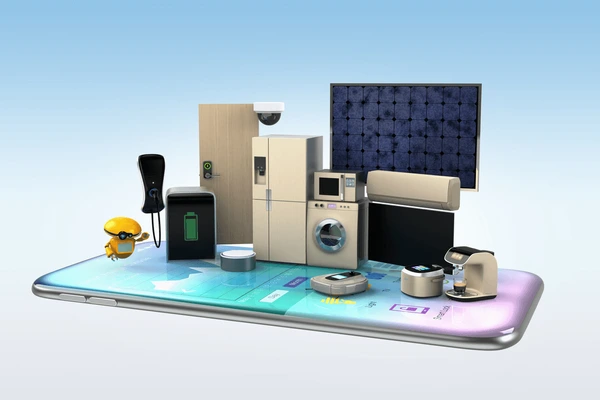
- IoT is the plumbing: sensors, wireless chips, and cloud connections that let a device send and receive data.
- AI is the brain: algorithms—often machine learning—that spot patterns (e.g., “you run the dishwasher at 9 PM”) and optimize behavior (“delay start to off-peak power rates”).
In practice, an appliance collects data through sensors (temperature, vibration, humidity, power draw), processes it locally or in the cloud, then acts: adjust a setpoint, trigger a notification, or recommend maintenance.
What “smart” looks like across common appliances
| Category | Typical Sensors & Signals | AI-Driven Smarts | Everyday Win |
|---|---|---|---|
| Thermostats & HVAC | Temperature, motion, humidity, geofencing | Learns schedules, auto-optimizes for comfort vs. cost | Lower bills with minimal tinkering |
| Washers & Dryers | Load size, turbidity, vibration, moisture | Auto-dose detergent, cycle prediction, imbalance detection | Fewer re-washes and fabric wear |
| Refrigerators | Door open time, temp zones, cameras | Food spoilage alerts, inventory suggestions | Less waste, better meal planning |
| Ovens & Ranges | Temp probes, cameras, gas/airflow | Cook-by-photo or recipe, preheat optimization | More consistent results |
| Dishwashers | Water clarity, temperature, motor torque | Adaptive cycles, filter alerts | Cleaner dishes, less water |
| Robot Vacuums & Mops | LIDAR/camera, cliff sensors | Room mapping, obstacle ID, schedule learning | Set-and-forget floor care |
The real benefits (beyond novelty)
- Convenience without micro-management
Good systems cut fiddling. Schedules learn themselves; notifications arrive only when you need them (e.g., “lint screen clogged,” not “it’s Tuesday”). - Efficiency and cost savings
AI shines when it can coordinate devices: pre-cooling during cheaper electricity windows, delaying a dishwasher until solar panels peak, or automatically choosing eco cycles. - Predictive maintenance
Vibration signatures and error codes can forecast failing bearings or clogged filters days or weeks early. That can prevent secondary damage—and panic calls. - Accessibility and safety
Voice control and routines help users with mobility or vision challenges. Leak sensors and shut-off valves can curb costly water damage; gas ranges can warn of unlit burners.
The trade-offs and how to manage them
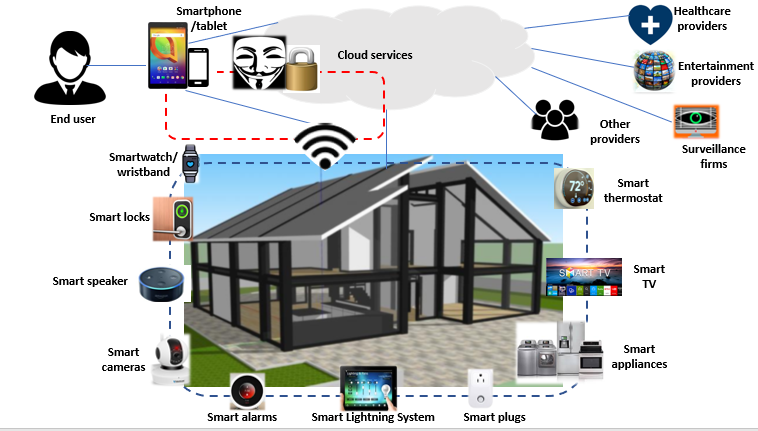
- Privacy: Some devices process data in the cloud; others keep it on-device. Check what’s collected (audio? video? usage logs?) and whether you can opt out.
- Security: Unpatched devices can be weak links. Prioritize brands with a track record of updates and encrypted connections. Change default passwords, enable two-factor authentication, and segment IoT gadgets on a guest or VLAN network if your router allows.
- Longevity: Cloud services can be discontinued. Favor products that retain core features offline, support local APIs, or work with neutral hubs.
- Interoperability: Closed ecosystems force compromises. Look for compatibility with open standards like Matter and widely supported platforms (Apple Home, Google Home, Alexa, Home Assistant).
A quick roadmap to a smarter (not fussier) home

- Start with goals, not gadgets
Want lower energy bills? Focus on thermostats, plugs, and large appliances with energy dashboards. Hate laundry chaos? Seek washers with auto-dosing and cycle recommendations. - Prioritize the “everyday path”
If guests or kids use a device, it must work from the front panel—no phone required. Smart features should enhance the default experience, not replace it. - Pick a primary ecosystem—keep escape hatches
It’s fine to gravitate to one platform for routines and voice control. Just ensure devices also support Matter or a local API so you can pivot later. - Stage your rollout
Add a few devices, stabilize, then expand. This avoids notification overload and lets you tune automations before the next wave. - Document your setup
Keep a simple note of Wi-Fi SSIDs, admin logins, and reset steps. Future-you will be grateful when you upgrade routers or move house.
Practical automations that most homes actually use
- Presence-based comfort: When everyone leaves, thermostats shift to eco mode and lights turn off. When the first person returns, pre-cool or pre-heat.
- Laundry sanity saver: Washer notifies when a cycle ends; if the door stays closed for 30 minutes, send a second nudge to avoid musty clothes.
- Water guardian: Leak sensors under sinks and behind the washer trigger an audible alarm and push alert; a smart valve shuts the main line.
- Silent efficiency: Dishwasher and EV charging defer to off-peak rates automatically; a solar-aware rule prefers sunny hours.
- Safety routine: At 11 PM, the oven is turned off, the doors lock, and selected lights dim to a night scene.
Buying checklist (cut through the marketing)

- Local control first: Does the device retain core features if the internet goes down?
- Update policy: How long does the vendor promise security patches?
- Standards support: Matter, Thread, or at least well-documented APIs.
- Data transparency: A clear privacy policy with opt-outs.
- Repairability & parts: Filters, batteries, and seals should be easy to source.
- Energy insights: Look for real consumption data—not just “eco” badges.
- Accessible controls: Physical buttons that remain usable without the app.
Troubleshooting: when smart isn’t acting smart
- Connectivity gremlins: Check 2.4 GHz vs 5 GHz networks; many appliances prefer 2.4 GHz. Reserve DHCP addresses to prevent devices from “moving around.”
- Noisy environments: If voice commands misfire, rename devices with distinct words (“Kitchen Lamp” → “Galley Light”).
- False alerts: Calibrate sensors (e.g., leak pads away from condensation). Tweak notification thresholds.
- App fatigue: Consolidate into a single dashboard or hub and disable redundant pings.
- Firmware loops: If an update stalls, power-cycle the device, then the router. Keep a paperclip nearby for pin-hole resets—it’s still the universal fix.
For step-by-step walkthroughs and non-promotional advice, browse Appliance Rescue—again, they publish Expert Guides, Appliance Tips, and Troubleshooting Advice, and do not offer repair services. Stuck on a configuration question or need guidance on what to buy next? You can Contact us for help.
The near future: from “connected” to truly cooperative
We’re moving from individual smart devices to cooperative homes where appliances coordinate in real time. A dryer might delay its cycle because the oven is already drawing peak power; a fridge pauses defrost when the utility signals a grid event; a vacuum cleans after your toddler’s nap ends because it noticed the nursery sound monitor shift from white noise to chatter. The tech isn’t perfect—and it shouldn’t run your life—but used thoughtfully, it can give you quieter routines, lower bills, and fewer household “uh-oh” moments.
Final note
Treat “smart” as a layer that augments durable, well-built appliances—not a reason to buy flimsy hardware. Start with one or two high-impact upgrades, keep your network tidy, and lean on neutral resources like Appliance Rescue for clear, vendor-agnostic guidance. If you need tailored pointers for your home setup, you can always Contact us.